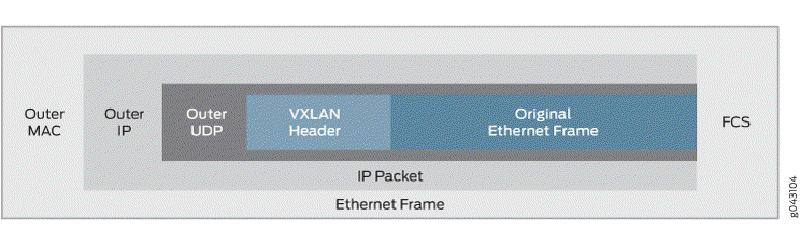
recently i took a look at VXLAN for my Homelab.
the problem with KVM
the default bridge behaviour of KVM restricts VMs running on the same host to communicate with each other and even the host itself. There are workarounds to get this running but why not overcomplicate the things.
why VXLAN
VXLAN can be described as a VLAN without messing around with the Port configs on your switch.
A virtual Interface (VTEP) on the Hosts in my case the KVM Hosts and an OPNSense encapsulate the traffic and will transmit over Multicast.
Setup
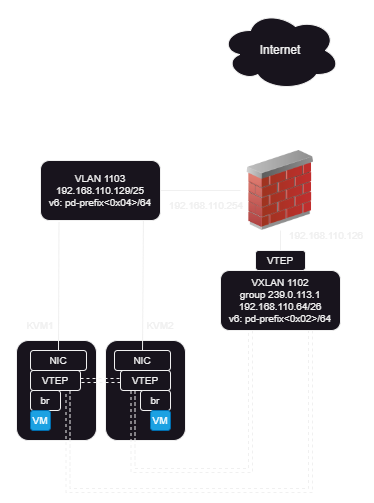
KVM Config
as a quick and dirty config the following could be used. But be aware this won’t survive a reboot of your host.
1
2
3
4
5
|
{{ vni-id }} {# 1102#}
{{ local-ip }} {# 192.168.110.131 #}
{{ mcast-group }} {# 293.0.113.1 #}
{{ local-if }} {# eno1 #}
|
1
2
3
4
5
|
ip link add vxlan{{ vni-id }} type vxlan id {{ vni-id }} dstport 4789 local {{ local-ip }} group {{ mcast-group }} dev {{ local-if }}
ip link add br{{ vni-id }} type bridge {# create bridge interface #}
ip link set vxlan{{ vni-id }} master br1102
ip link set up dev vxlan1102 {# bring vxlan interface up #}
ip link set br1102 up {# bring bridge up #}
|
to persist the Configuration nmcli seems to b a valid choice.
1
2
|
nmcli connection add type bridge ifname br1102 ipv4.method disabled ipv6.method disabled
nmcli connection add type vxlan slave-type bridge con-name br1102-vxlan1102 ifname vxlan1102 id 1102 local 192.168.110.132 remote 239.0.113.1 master br1102 dev enp1s0f0 destination-port 4789
|