in Part 2 for the Docker registry cache we extend the features for ghcr.io (Github Container Registry) and quay.io (RedHat Container Registry)
quick and dirty way
to avoid tinkering with fully blown Container registries like:
we only want to proxy the requests and cache the artifacts for consecutive pulls.
To achieve this we will leverage the same Container image from Part 1, but will point it to the other registries.
Since Part 1 i switched the storage backend to a S3 bucket hosted with my CEPH Cluster via Rados-GW.
GHCR Cache Configuration
 1
 2
 3
 4
 5
 6
 7
 8
 9
10
11
12
13
14
15
16
17
18
19
20
21
22
23
24
25
26
27
28
29
30
31
32
33
34
35
36
37
38
39
40
41
42
43
44
45
|
# ghcr.yml
version: 0.1
log:
  level: info
  fields:
    service: registry
    environment: development
storage:
  cache:
    blobdescriptor: inmemory
  # if you don't want to use s3 uncomment this line and add a volume mount to the container for this path
  #    filesystem:
  #        rootdirectory: /var/lib/registry-cache

  # comment the whole section if filesystem is used
  s3:
    #      accesskey: defined through env
    #      secretkey: defined through env
    region: default
    regionendpoint: <your S3 endpoint>
    bucket: registry
  delete:
    enabled: true
  maintenance:
    uploadpurging:
      enabled: true
      age: 168h
      interval: 24h
      dryrun: false
http:
  addr: :5000
  secret: asecretforlocaldevelopment
  debug:
    addr: localhost:5001
  headers:
    X-Content-Type-Options: [nosniff]
  http2:
    disabled: false
proxy:
  remoteurl: https://ghcr.io
health:
  storagedriver:
    enabled: true
    interval: 10s
    threshold: 3
|
QUAY Cache Configuration
for quay.io the Configuration is identical to GHCR except proxy remoteurl is set for quay.io
1
2
3
4
5
|
# quay.yml
...
proxy:
  remoteurl: https://quay.io
...
|
combine all the things
env file
we will use an .env file to inject secrets in the container.
1
2
3
|
# .registry.env
REGISTRY_STORAGE_S3_ACCESSKEY=<your S3 Key>
REGISTRY_STORAGE_S3_SECRETKEY=<your S3 Secret>
|
Folder Structure
the Updated folder Structure will look like this
1
2
3
4
5
6
7
|
registry
├── .registry.env
├── config
│  ├── config.yml
│  ├── ghcr.yml
│  └── quay.yml
└── docker-compose.yml
|
Docker Compose
as described in Part 1, the Traefik configuration will expose the Servers with their Service Name and serve them over https with a LE wildcard Certificate.
This will lead to the following FQDNs.
 1
 2
 3
 4
 5
 6
 7
 8
 9
10
11
12
13
14
15
16
17
18
19
20
21
22
23
24
25
26
27
28
29
30
31
32
33
34
35
36
37
38
39
40
41
42
43
44
45
46
47
48
49
50
51
52
53
54
55
|
---
version: "3"
services:
######################  Docker Hub Registry ######################
  registry:
    container_name: registry
    image: registry:latest
    env_file:
      - .registry.env
    volumes:
      - {{ storage-path }}registry/config/config.yml:/etc/docker/registry/config.yml
#     - {{ storage-path }}registry/cache:/var/lib/registry-cache
    restart: unless-stopped
    labels:
      traefik.enable: true
      traefik.http.routers.registry.entryPoints: https
      traefik.http.services.registry.loadbalancer.server.port: 5000
    networks:
      - proxy
######################  Github Container Registry ######################

  registry-ghcr:
    container_name: registry-ghcr
    image: registry:latest
    env_file:
      - .registry.env
    volumes:
      - {{ storage-path }}registry/config/ghcr.yml:/etc/docker/registry/config.yml
    restart: unless-stopped
    labels:
      traefik.enable: true
      traefik.http.routers.registry-ghcr.entryPoints: https
      traefik.http.services.registry-ghcr.loadbalancer.server.port: 5000
    networks:
      - proxy
######################  Quay Container Registry ######################

  registry-quay:
    container_name: registry-quay
    image: registry:latest
    env_file:
      - .registry.env
    volumes:
      - {{ storage-path }}registry/config/quay.yml:/etc/docker/registry/config.yml
    restart: unless-stopped
    labels:
      traefik.enable: true
      traefik.http.routers.registry-quay.entryPoints: https
      traefik.http.services.registry-quay.loadbalancer.server.port: 5000
    networks:
      - proxy
networks:
  proxy:    # rename this to your custom docker network.
    driver: bridge
    external: true
|
put it to the test
A first pull of an Image should be dependent on your ISP connection and may be slower. Consecutive pulls of the same container even on other machines should be faster but may also depend on your local storage and network.
The pulls can be done either from docker or even podman. we will measure the time for the first and a second download from the same and a 3rd from another machine afterwards.
we will use the quay.io Prometheus image for the test link
initial Pull
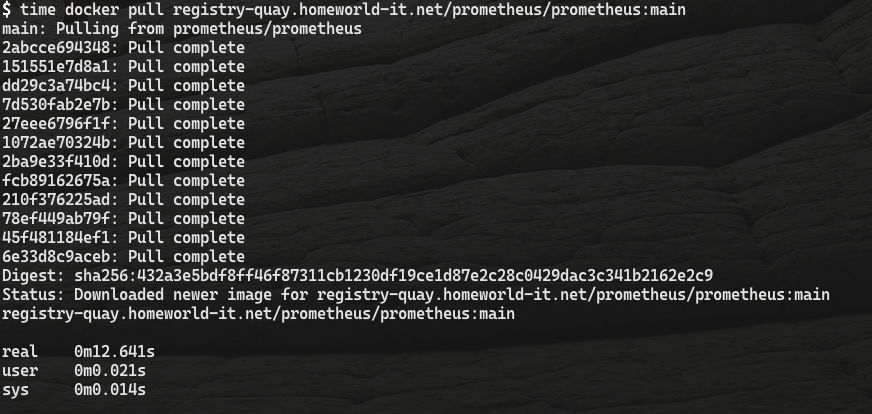
The initial pull of the image took 12seconds
second Pull
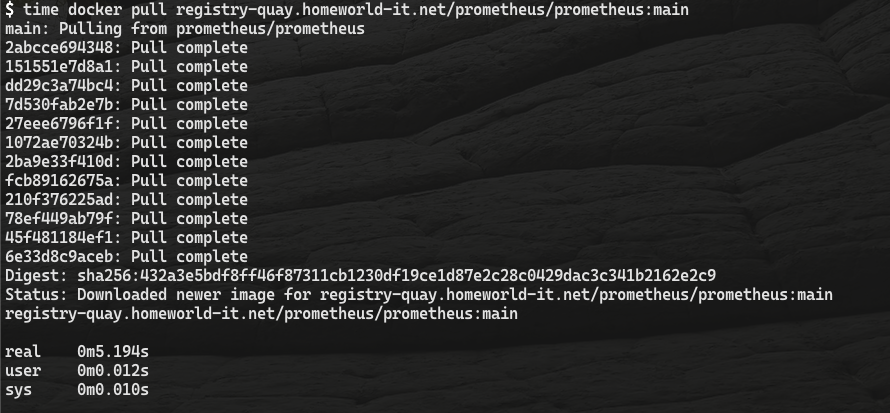
after deleting the image the second pull took only 5 seconds.
third Pull - other machine
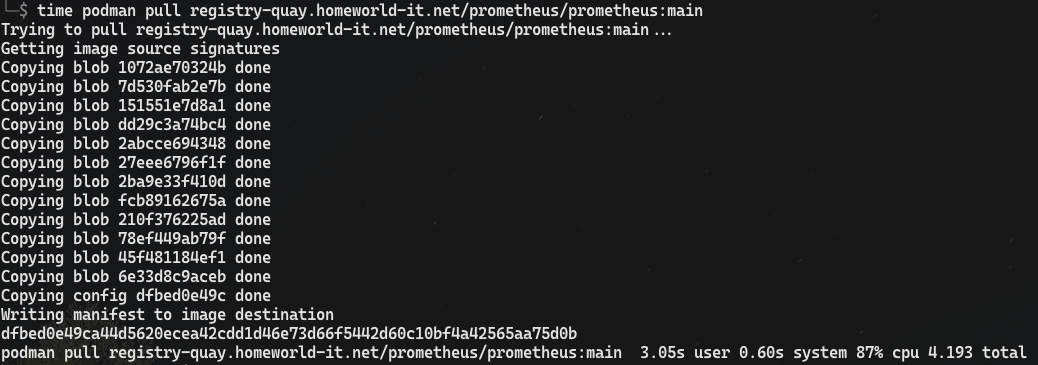
pulling it with Podman from a different machine took only 4 seconds