in a recent experiment i tried to achieve a simpler version of Anycast for Services like DNS and NTP at home.
the basic theory of Anycast is pretty good described by Cloudflare What is Anycast-DNS
Why
would this be interesting in a Homelab scenario you might ask?
- Most Operating Systems have a limitation for a maximum of 3 DNS Servers they can handle. In a dual Stack Environment with 2 DNS Servers each reachable over IPv4 and IPv6 you are already over the limit.
- in case of an unavailable server to avoid waiting to failover for the DNS Client the Anycast mechanism will take out a not functioning Server
- load-balancing is one of the last reasons. If you provide redundant DNS Servers with Pi-Hole, Bind9 or something else you would notice an imbalanced query amount on your servers.
 And why shouldn’t your provided Services be used ;)
How?
If you ask yourself how? Well let me tell you. My internal Network has 2 Pi-Hole instances one in a LXC Container inside a local Proxmox Server and a Raspberry PI. There are also 2 Authorative DNS Servers for internal DNS Domains.
Each Service resides in its own VLAN to regulate the Access and external Communication, no System from my internal Networks is allowed to make external DNS Connections except the Pi-Hole Servers.
The Anycast Mechanism will be accomplished with BGP on each Server and my internal OPNSense as central Router.
To establish BGP Sessions from the Server to the Gateway the Following Packages are used.
- ExaBGP is a service to Provide a BGP Session from each Server to my central Gateway and announce the Anycast IPs
- ExaCheck provides Checks to conditionally announce the IPs with ExaBGP
Preparation:
at first you have to prep the Servers. I configured the already existing loopback interfaces on each server with additional Anycast IP addresses.
| Server | OS | IPv4 | Anycast IPv4 | Anycast IPv6 |
|---|---|---|---|---|
| dns01 | Debian | 192.168.200.65 | 192.168.200.70 | fd00:0:3:ee02::53 |
| dns02 | Debian | 192.168.200.66 | 192.168.200.70 | fd00:0:3:ee02::53 |
| pi01 | Fedora | 192.168.110.193 | 192.168.200.53 | fd00:0:3:ee0f::53 |
| pi02 | Alma | 192.168.110.194 | 192.168.200.53 | fd00:0:3:ee0f::53 |
RHEL based Systems:
|
|
Debian:
|
|
You could also add additional loopback or dummy interface and assign those these IP’s.
ExaBGP and ExaCheck
the following package which seems to be available in every mayor Linux Distribution is required.
|
|
OPNSense BGP configuration
to activate Multipathing a system tunable is required for OPNSense. In System -> Settings -> Tunables an entry needs to be created net.route.multipath with the value 1, since this is a runtime tunable no reboot is required.
Next in System -> Firmware -> Plugins search for the Package OS-FRR and install it. A new Menu Routing should appear (if not refresh the page).
In Routing -> General enable the Service and press Save, go to BGP inside the Routing Tab and also enable the Service and enter 64512 as BGP AS Number and Save the Config.
Inside the BGP menu go to Neighbors and add a new. Activate Advanced Mode at the top and fill it with the following options.
|
|
repeat the steps for all servers and press the small ♼ symbol to the bottom right.
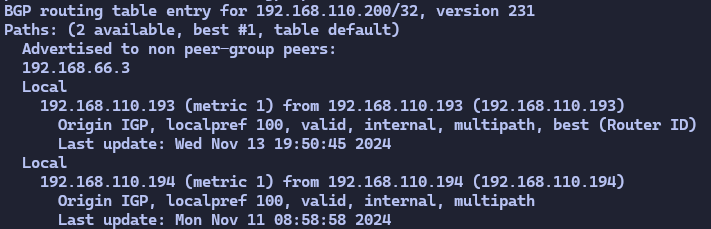
if i stop the pihole service with systemctl stop pihole-FTL.service a journalctl -fu exabgp provides me these messages.
|
|
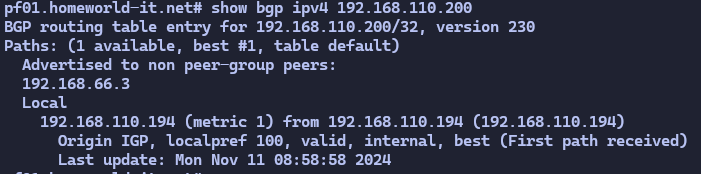
The bgp service on my gateway only shows one path.
why not x?
- use keepalived
- Pi-Hole and also other Services sh*t itself if they boot with the Secondary Keepalived IP and those services need to be restarted. Sometimes even after a keepalived failover
- use nginx, ha-proxy, { insert random load-balancer }
- they will work, but you need to provide the LB Service somewhere and achieve HA with the LB (read the above again)
- putting the DNS Service behind a LB also makes it impossible or very hard to troubleshoot which client querys certain services because your DNS will show the LB as query Source.